Product-led growth, or PLG, has become a bit of a buzzword lately, and I’ve had a few people ask me about it in relation to their startup, and how we did things at Atlassian.
First, a quick definition of product-led growth, courtesy of Wes Bush:
Unlike sales-led companies where the whole goal is to take a buyer from Point A to Point B in a sales cycle, product-led companies flip the traditional sales model on its head. Product-led companies make this possible by giving the buyer the “keys” to use the product and helping them experience a meaningful outcome while using the product. At this point, upgrading to a paid plan becomes a no-brainer.
At Atlassian, this was how we sold our products from the start. Our typical evaluator was a developer or manager of a dev team, who had heard about Jira, Confluence, Trello, etc. and came to our website to get started with one of our products.
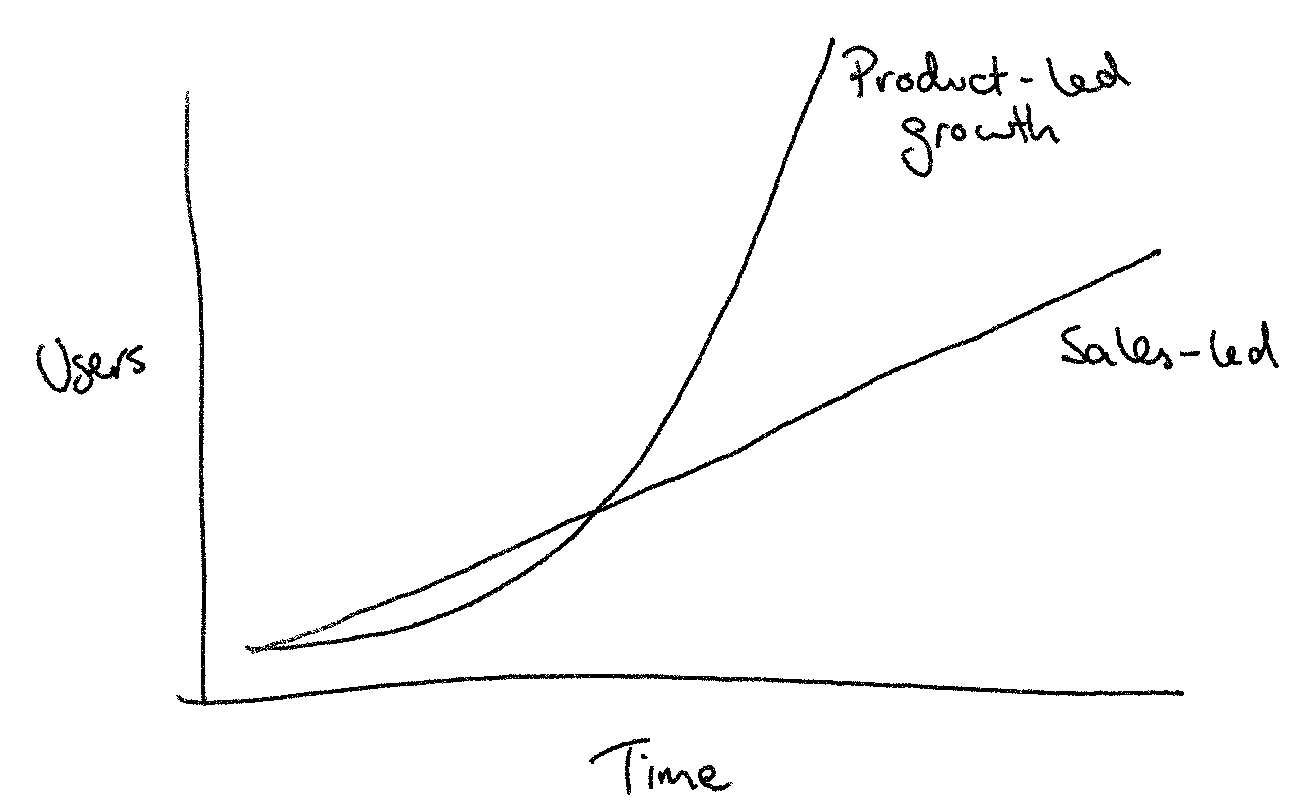
Perhaps it’s obvious, but it’s also worth pointing out why you might want product-led growth for your business. Having a product-led sales process means you can spend less on salespeople, and your business will start to grow organically over time, with a sustainable or even decreasing customer acquisition cost (CAC). Product-led growth enables the so-called “hockey stick graph” that internet startups love to show:
The rest of the article provides answers to the typical questions I hear from startups about how they can achieve product-led growth.
Can we apply product-led growth in other industries?
This one of the key questions about PLG – can it work in areas outside of SaaS, like real estate or hardware? Put another way, what are the prerequisites for a product-led growth model in terms of the product and market?
In my view, a product-led sales model is dependent on:
- A product which can be adopted self-serve, and
- An audience which actually prefer trying and buying their own products.
Back in the early ’00s, Atlassian had quite a revolutionary model for selling business software. They set a price which was affordable (starting at ~$1k per year), for products which were relatively full-featured, and easy for customers to set up by themselves. This covered off the first point.
The second one was addressed by the main “land” market for Atlassian’s products, software teams. Software people are happy to be early adopters of new products, because they like being seen as the computer experts by their friends.
It’s worth going into a bit more detail about how the adoption process works in a product-led model. The diagram below shows how it works:
- Your product needs an internal champion, who has the idea of trying out your product and evaluating it.
- Once they’ve fallen in love with it, they invite their colleagues, who use the product and give their approval back to the champion.
- The champion uses their internal support to drive the process of purchasing and rolling out the product across the organisation.
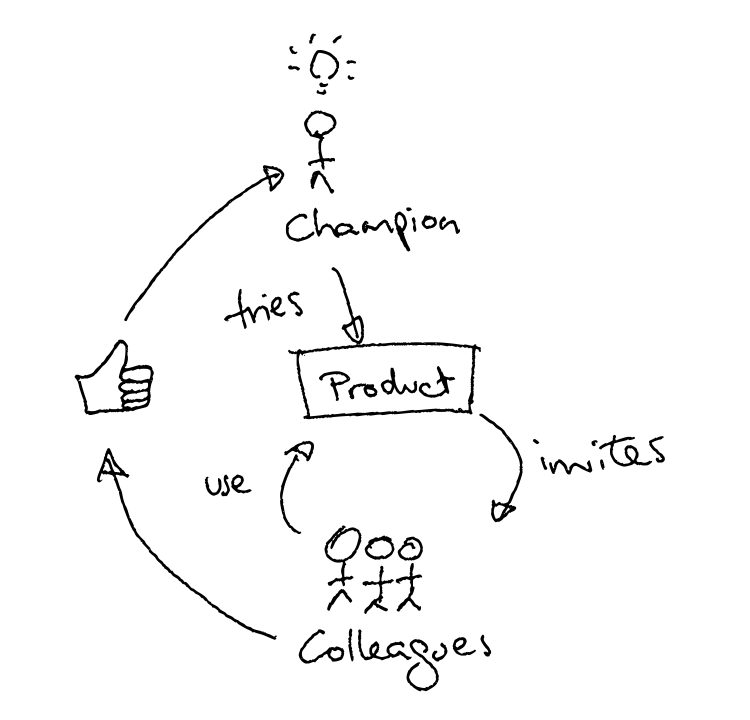
This model has two great aspects that spur a product’s growth. First, the positive feedback that a successful champion gets within their company makes them more likely to introduce the product again in future roles. Second, the fact that not just the original user, but also the coworkers, have to adopt and approve of the product, expands the pool of users like to refer the product to others, driving your word-of-mouth marketing.
The positive feedback that a successful champion gets within their company makes them more likely to introduce the product again in future roles.
If you look at other areas, like real estate or hardware, there are many companies experimenting to see if product-led growth is possible. For example, Tesla is trying to disrupt the existing network of car sellers by selling direct to consumers. You can see how their marketing strategy is trying to support a set of “champions” who spread their brand through word-of-mouth.
Here are some of the questions I ask to help determine whether PLG is viable in a given market:
- Who buys your product, and is it the same as the person using the product? Can you make it the same person, at least for the evaluation period?
- Do your users enjoy trying out new products, like software people do? How can you make it easy for them to do so?
- Who are going to be the internal champions for your product in an organisation? What job titles do they have, and how do they discover new products?
Differences between buyer and user, and users who are not comfortable trying out new products are the major sticking points you’d want to cover off with your early user testing.
How can we test and determine whether PLG is possible in our area?
My recommendation here is to look at the Lean Startup model, which tries to define a systematic approach to designing a minimal product for users and trying to get them to use it. Read Lean Startup by Eric Ries to get started.
Right from the beginning, you should be looking for early signs of the product being adopted self-serve by the target buyer. If you can see indications that this will work, then you need to double down on your product work to optimise optimise optimise that process. By contrast, if you always need to hand-hold the buyers through the process, regardless of how easy you make your product’s setup process, then it might not be possible to fit your business into the product-led model.
In terms of metrics, the most important ones are early stage funnel metrics. So you want to track your website visits, “try intents” (people who click a try button), signups, and every step through the setup process. Then you need to reach out to talk to the customers one-on-one, to get detailed feedback on their hurdles as they try the product. This could be via Intercom or just emailing people after they sign up.
Atlassian did not do much of this stuff in the early days because our software was downloaded originally, and the techniques were also not well described yet. Instead, our team build products we wanted to use, as we were software developers ourselves. We also had a public issue tracker where customers would raise feature requests, and the team leads used to review all the feedback, go back and forth with customers when implementing, and add features pretty rapidly.
Validating the potential for a product-led growth model needs a lot of leg-work. There is no substitute for talking to those people who have tried (and potentially failed) to adopt your new service, and working out how to get them past their initial hurdles. Even if you build something to scratch your own itch, you’ll need to quickly move from there to taking on feedback from real users.
How do you implement an upsell/cross-sell strategy in the product?
In terms of converting free customers to paid, Atlassian originally had a free 30 day trial for download products, and now offers “freemium” products in the cloud. Making the evaluation process free and very easy is important, and the price needs to be easily purchasable on a credit card. (This depends on your audience, but should probably be <$100 per month starting point for a typical paid team.)
For a freemium strategy to work, you have to identify features which are key to use of the product as it scales within a business. For many enterprise products, permission features are a natural fit here. Small teams can get by without them, but larger teams naturally need more support dividing up their work and restricting access to different bits of it.
Atlassian has tried many things for cross-sell, but the three strategies we saw working consistently were:
- Build useful integration features to ensure that the products work well together. Confluence and Jira both had features that connected the two products starting from 1.0, which made them a natural set to buy together.
- Bundle related products together as a default evaluation setup, e.g. Jira and Confluence. This is like how Microsoft used to sell Office as the bundle of Word + Excel + Powerpoint. We didn’t even discount (and still don’t, I believe), but people still bought them together because they worked well together.
- Suggest other products only when appropriate based on customer behaviour or data thresholds. For example, a Trello customer might see a “try Jira” popup once they hit >100 cards on a board or >10 boards. A Jira Software customer with a “support” ticket type might get a suggestion to try Jira Service Desk.
We tried a number of cross-sell marketing campaigns (e.g. emails to customers of our other products) but they had only limited success. For cross-sell emails to be successful, they need to arrive just when a customer is getting started with a product, or coincidentally when they happen to really need something. Just emailing them at random times was ineffective at best and annoying at worst.
It’s important to note that you shouldn’t focus on up-sell or cross-sell at all until you have a very successful product that customers are willing to buy. Especially in the case of cross-sell, each product needs to succeed or fail on its own terms as a product, and then cross-sell is a slight accelerator. You definitely don’t want to send your best customers to try out something that isn’t ready for prime time yet.
How do we structure and build an org that’s conducive to PLG?
I’d say it’s pretty typical for products now to be designed for PLG as the default. Things like:
- You need to continually iterate on the user experience, so that your product is the absolute easiest and best way for the customer to achieve their goals.
- You want to encourage deeply understanding the customers through analytics and interviews. How many users signed up each day? How did they hear about you? What feature did they try first? Why did they stop using the product?
- You need product designers to design the entire flow for the end user, from website to signup to setup and using the product. You can’t have a separate team designing and building the website.
In my experience, most startup teams want to operate like the above, but they there are usually also areas to improve. Customer-centric product strategy and design coupled with a lean approach (“what is the minimum we can do to learn?”) is what you need to aim for.
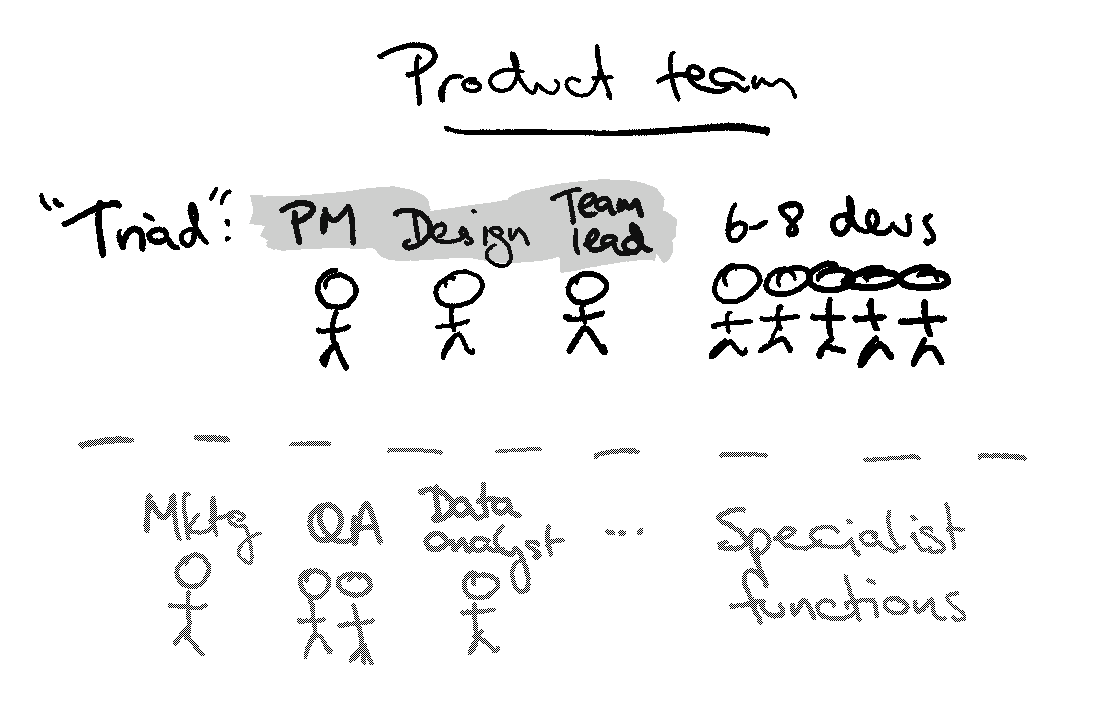
In terms of concrete structures, Atlassian’s product teams are typically structured like this:
- Product manager - in charge of product priorities, roadmap, customer interviews, etc.
- Designer - designs the interface (and more recently the text)
- Dev team lead - manages the backlog, bug fixing, interacts with support, etc.
- 8-10 devs led by each “triad” above of PM/dev/design
Other roles are added on an as-needs basis, like product marketing, tech writing, QA, data analyst, etc. and usually work across multiple product teams.
When I started in 2006, we had two product dev teams for Jira and Confluence, but no PMs or designers yet. The founders were the de facto PMs, and each team had a dev lead. We added PMs as the founders needed to step away, and designers as design became more important to software over time.
How do we get the rest of the org to buy in? What are the right metrics to track?
As the question implies, some measurement of success, even in early stage metrics, helps get buy-in for this approach. If you can show a few dozen potential evaluators coming to the website, who convert into paying customers with a steady conversion rate, and start to lift those numbers over time, then you’ll have a working product-led growth engine.
Our founders and co-CEOs, Scott and Mike, used to track our eval and sales figures daily and weekly, because once this engine starts going, anything that’s unusual becomes quite obvious. Growth becomes the normal state of things. Scott’s priority was tracking new customer evaluations rather than conversion or existing customer renewals/expansion, as this is a true indicator of growth.
Good luck with product-led growth!
I’d love to hear about your experiences and challenges with product-led growth in your startup. Feel free to email me if you have further questions or suggestions to improve this article.